Features
 [su_divider style=”double” margin=”30″]
[su_list icon=”icon: music”][su_list icon=”http://localhost/GuitarAnalyzerCom/wp-content/uploads/2013/03/music_grey.ico”]
- [wp_lightbox_fancybox_anchor_text_image link=”https://guitaranalyzer.com/wp-content/uploads/2018/07/EMajModes_TridArpAllPos.png” title=”Create Professional Looking Guitar Diagrams” text=” Create professional looking pages layouts for guitar instructional publishing “]
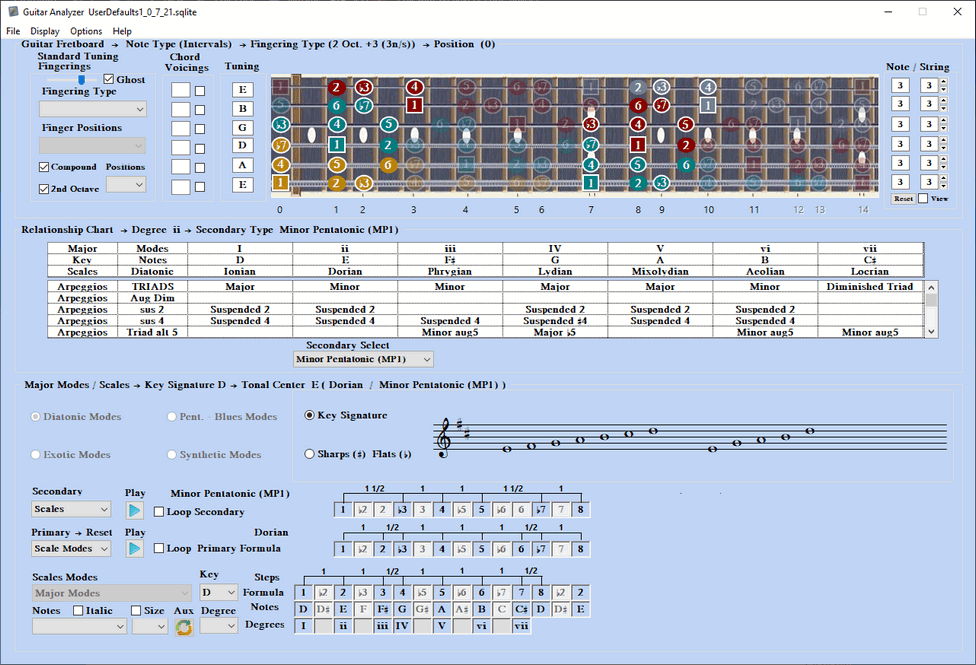
- [wp_lightbox_fancybox_anchor_text_image link=”https://guitaranalyzer.com/wp-content/uploads/2015/12/AnalyzeHarmonyChart01.png” title=”Harmony Chart” text=”Analyze scale mode harmony charts to each degree of a scale”]
- [wp_lightbox_fancybox_anchor_text_image link=”https://guitaranalyzer.com/wp-content/uploads/2015/12/AnalyzeFormula.02.png” title=”Scale View Analysis” text=”Analysis formula to notes and step spacing of the intervals”]
- [wp_lightbox_fancybox_anchor_text_image link=”https://guitaranalyzer.com/wp-content/uploads/2015/12/MusicStaff03.png” title=”Music Staff” text=”Music staff displays manuscript scales and arpeggios with or without a Key Signature”]
- [wp_lightbox_fancybox_anchor_text_image link=”https://guitaranalyzer.com/wp-content/uploads/2015/12/NotePlayer04.png” title=”Note Player” text=”A note player that plays the audio notes for each primary scale and secondary scale or arpeggio”]
- [wp_lightbox_fancybox_anchor_text_image link=”https://guitaranalyzer.com/wp-content/uploads/2015/12/105 Scale Types.png” title=”105 Scale Types” text=”92 Scale Types in 4 select categories (Diatonic, Pentatonic – Blues, Exotic and Synthetic Scales)“]
- [wp_lightbox_fancybox_anchor_text_image link=”https://guitaranalyzer.com/wp-content/uploads/2015/12/10 ScaleModeTypes.png” title=”10 Scale Mode Types” text=”10 Scale Mode Types in 3 Select Categories (Diatonic Modes, Pentatonic – Blues Modes, and Exotic Modes)”]
- [wp_lightbox_fancybox_anchor_text_image link=”https://guitaranalyzer.com/wp-content/uploads/2015/12/ScaleModeDegreeSelect.png” title=”Every Mode Degree” text= ” Every scale mode degree can instantly be selected”]
- [wp_lightbox_fancybox_anchor_text_image link=”https://guitaranalyzer.com/wp-content/uploads/2015/12/PrimarySecondary07.png” title=”Primary to Secondary” text=” Primary to secondary scale analysis: Scale / Scale, Scale / Arpeggio “]
- [wp_lightbox_fancybox_anchor_text_image link=”https://guitaranalyzer.com/wp-content/uploads/2015/12/SecondaryNoteBdr08.png” title=”Secondary Notes” text=” The secondary matched notes display with border on the guitar fret board”]
- [wp_lightbox_fancybox_anchor_text_image link=”https://guitaranalyzer.com/wp-content/uploads/2015/12/HarmSclRelChart450x350.jpg” title=”Harmony Chart” text=” All secondary scales and arpeggios are matched by a database and are loaded into a relationship chart”]
- [wp_lightbox_fancybox_anchor_text_image link=”https://guitaranalyzer.com/wp-content/uploads/2015/12/SecondaryMovetoDegree10.png” title=”Secondary Aligns” text=” The secondary selection moves in line under the mode degree of the relationship chart”]
- [wp_lightbox_fancybox_anchor_text_image link=”https://guitaranalyzer.com/wp-content/uploads/2015/12/Secondary Filter 11.png” title=”Secondary Filter” text=”The matched secondary scales and arpeggios or can be filtered”]
- [wp_lightbox_fancybox_anchor_text_image link=”https://guitaranalyzer.com/wp-content/uploads/2015/12/3NoteDisplayTypes12.png” title=”4 Note Types” text=”Note displays in 3 select-able views: (Notes – Sharps, Flats), (Intervals), (Finger Placement)“]
- [wp_lightbox_fancybox_anchor_text_image link=”https://guitaranalyzer.com/wp-content/uploads/2015/12/NonColor_Color 13.png” title=”Color Octave” text=”Root notes displays a square outline and octaves can be color separated or one green color”]
- [wp_lightbox_fancybox_anchor_text_image link=”https://guitaranalyzer.com/wp-content/uploads/2015/12/RightLeftHandGuitDisp 14.png” title=”Right & Left Handed” text=”Right & left handed guitar fret board graphic display”]
- [wp_lightbox_fancybox_anchor_text_image link=”https://guitaranalyzer.com/wp-content/uploads/2015/12/AllFingeringType.png” title=”All Fingering Types” text=”Every scale has a select-able fingering from 1 Octave in between up to 3 Octave and 3 Shapes (Standard Tuning Only)“]
- [wp_lightbox_fancybox_anchor_text_image link=”https://guitaranalyzer.com/wp-content/uploads/2015/12/AllFngPositions.png” title=”All Fingering Postions” text=”Every in range position can be selected on the Guitar Fret Board”]
- [wp_lightbox_fancybox_anchor_text_image link=”https://guitaranalyzer.com/wp-content/uploads/2015/12/2nd OctaveFingering 17.png” title=”2nd Octave Fingering” text=”The 2nd Octave Fingering can be selected and displayed”]
- [wp_lightbox_fancybox_anchor_text_image link=”https://guitaranalyzer.com/wp-content/uploads/2015/12/CompoundInterval 19.png” title=”Compound Intervals” text=”Compound interval in a secondary arpeggios can be switched in to a specific string”]
- [wp_lightbox_fancybox_anchor_text_image link=”https://guitaranalyzer.com/wp-content/uploads/2015/12/9 Different Tunings 19.png” title=”9 Different Tunings” text=”9 Different Tuning types can be selected. Fingerings only work for standard tuning”]
- [wp_lightbox_fancybox_anchor_text_image link=”https://guitaranalyzer.com/wp-content/uploads/2018/07/FretBrdOptSeFretBrdColors650x4471_0_7_17.png” title=”8 Guitar Fret Board Colors” text=” Choose from eight different Guitar Fret Board Colors”]
- [wp_lightbox_fancybox_anchor_text_image link=”https://guitaranalyzer.com/wp-content/uploads/2015/12/FretBoardOptNtColorFrtBrd.png” title=”Custom Note Color Presets” text=” Create custom note color presets for all note or color octave separation”]
- [wp_lightbox_fancybox_anchor_text_image link=”https://guitaranalyzer.com/wp-content/uploads/2015/12/CustomPresetSavePrefer.png” title=”Fret Board Custom Preset Preference” text=” Fret Board Custom Preset Preference set for when software is launched”]
- [wp_lightbox_fancybox_anchor_text_image link=”https://guitaranalyzer.com/wp-content/uploads/2018/07/CreateDiagramImgWin.png” title=”Create Professional Looking Guitar Scale Diagrams” text=” Create professional looking fingering diagrams for guitar instructional publishing “]
- [wp_lightbox_fancybox_anchor_text_image link=”https://guitaranalyzer.com/wp-content/uploads/2015/12/SaveAsImg.png” title=”Save diagrams in popular graphic formats” text=” Save your custom guitar scale fingering diagrams in three popular graphic formats .png, .jpg, .bmp “]
- [wp_lightbox_fancybox_anchor_text_image link=”https://guitaranalyzer.com/wp-content/uploads/2015/12/ScrnShtECromItalic.png” title=”Italic Font Select for Notes” text=” Italic fonts can be selected for the guitar fret board display note text”]
- [wp_lightbox_fancybox_anchor_text_image link=”https://guitaranalyzer.com/wp-content/uploads/2015/12/FeaturesScreenShotTextSzSm.png” title=”Change Note Text Size” text=” Select Fret Board Notes Text Size “]
- [wp_lightbox_fancybox_anchor_text_image link=”https://guitaranalyzer.com/wp-content/uploads/2015/12/FeatureAuxFretBoard.png” title=”Auxilary Fret Board Display” text=” Auxilary Fret Board Display for Intructional Videos”]
- [wp_lightbox_fancybox_anchor_text_image link=”https://guitaranalyzer.com/wp-content/uploads/2015/12/FretBoardLeftRightFlipView.png” title=”Left Right Hand Flip” text=” New Flip View Feature for Left & Right Hand Guitar Display”]
- [wp_lightbox_fancybox_anchor_text_image link=”https://guitaranalyzer.com/wp-content/uploads/2022/11/Chord-Diagrams-Dom9-Mov1.png” title=”Professional Chord Diagrams” text=” Create Professional Chord Diagrams For Guitar Teaching & Publishing (Display – Notes, Intervals, Chord Fingers) “]
- [wp_lightbox_fancybox_anchor_text_image link=”https://guitaranalyzer.com/wp-content/uploads/2023/02/CreateCustomFingering.png” title=”Create Custom Fingerings” text=” Create Custom Fingerings or modify existing fingerings “]
[/su_list]